





I built my first proper gaming setup in 2007 with a second-hand Dell monitor, a membrane keyboard that came free with a PC from Argos, and a mouse I’d nicked from the family computer. The whole thing sat on a wallpaper pasting table in my bedroom and it was, honestly, brilliant. Nearly twenty years later the gear has improved beyond recognition but the fundamental question hasn’t changed — how do you put together a decent setup without spending your rent money? The answer in 2026, thankfully, is that £500 gets you dramatically more than it used to, as long as you know where to spend and where to cut corners.
This guide covers the full setup — monitor, keyboard, mouse, headset, chair, and desk — with real UK prices and specific picks. Whether you’re building around a console or a PC, this is the practical version, not the aspirational one. If you want gaming setup ideas with RGB everywhere and a triple-monitor ultrawide, that’s a different article entirely…

Console vs PC: where your money goes
The first question isn’t which keyboard to buy, it’s what you’re actually playing on — because that determines how much of your £500 budget gets eaten before you even think about peripherals.
A PS5 Slim or Xbox Series X runs around £450 at full price, which basically kills the entire budget in one go. An Xbox Series S is closer to £250, which leaves £250 for everything else — tight but workable. If you already own a console, you’re in a much better position because you can pour the full £500 into the stuff around it.
For PC gamers, this guide assumes you already have the tower sorted and you’re kitting out the desk. If you’re building a PC from scratch for under £500 including peripherals, that’s a different (and much harder) conversation. What we’re covering here is the setup — the things you sit at, look at, and touch — which applies equally whether you’re running a gaming laptop, a desktop, or a console plugged into a monitor.
One thing worth saying plainly: in 2026, a £250 Series S plus £250 of well-chosen peripherals will get you a better overall gaming experience than a £500 budget PC with whatever rubbish mouse and keyboard you had lying around. The setup matters more than people think.

The monitor (don’t cheap out here)
If there’s one place to put the lion’s share of your budget, it’s the screen. You can tolerate a mediocre keyboard for months but a bad monitor will make every single session worse. The good news is 2026 has some genuinely excellent budget monitors that would have been mid-range flagships three years ago.
For console gaming, a 27-inch 1080p IPS panel with a 75Hz refresh rate is perfectly adequate and can be had for £120-£140. The AOC 27B2H and the LG 27MP400 are both solid at that price, with decent colour accuracy and thin bezels. If you’re on a Series X or PS5 and want 4K, the jump to a 27-inch 4K monitor starts around £200 — the Samsung LU28R550 sits at roughly £210 and is hard to fault for the money.
For PC gaming, refresh rate matters more. A 24-inch 1080p 165Hz VA or IPS panel is the sweet spot — the AOC 24G2SP floats around £130 and delivers silky-smooth gameplay for competitive titles. If you can stretch to £170, a 27-inch 1440p 165Hz like the Gigabyte G27Q rev 2.0 is genuinely transformative for the price.
Budget here: £130-£200, depending on your platform and priorities.

Keyboard, mouse, and headset
This is where the budget gaming world has had its quiet revolution. Five years ago, cheap peripherals were genuinely horrible — mushy keys, imprecise sensors, headsets that sounded like someone playing music inside a biscuit tin. In 2026, the £20-£40 tier is shockingly good.
Keyboard (£30-£50)
The Redragon K552 remains absurdly good value at around £35 — mechanical switches, solid build, compact tenkeyless layout. If you prefer full-size, the Royal Kludge RK71 gives you wireless and hot-swappable switches for about £45. Either will last years and feel noticeably better than any membrane board. For console players who only need a keyboard for the occasional chat message, a £10 Amazon Basics job is genuinely fine — don’t overthink it.
Mouse (£20-£35)
The Logitech G203 at around £20 is the undisputed budget champion and has been for years. Reliable sensor, comfortable shape, absurdly cheap. If you want wireless, the Logitech G305 at about £35 is the step up — same excellent sensor, no cable, runs on a single AA battery for months. Console gamers using a controller can skip this entirely, obviously.
Headset (£25-£45)
The HyperX Cloud Stinger 2 at roughly £30 is comfortable, sounds better than it has any right to at the price, and works across PC, PlayStation, Xbox, and Switch. If you want wireless, the SteelSeries Arctis Nova 1 Wireless sits around £45 and punches well above its weight. If you’re also interested in streaming or recording audio on a boom arm, we’ve covered that separately — but for pure gaming, a decent headset is all you need.
Total peripherals budget: £75-£130.
Chair and desk
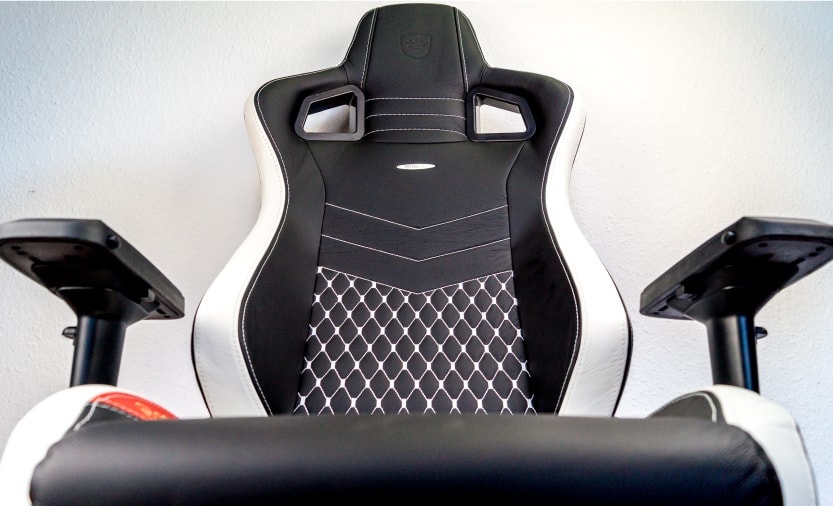
Here’s where I’m going to say something unpopular: do not buy a “gaming chair” for under £100. Most of them are built from recycled nightmares and wishful thinking, they look daft after six months, and the cushioning compresses into concrete within a year. I’ve owned two and regretted both.
Instead, look at basic ergonomic office chairs. IKEA’s MILLBERGET is about £75 and perfectly serviceable. The Hbada office chair on Amazon (the one with the flip-up arms) goes for around £90 and is genuinely comfortable for long sessions. If you can stretch to £120, the IKEA MARKUS is a classic for a reason — mesh back, decent lumbar support, five-year guarantee. Your back will thank you more than RGB lighting ever could.
For desks, simple is best at this budget. A 120cm desk from IKEA (the LAGKAPTEN top on ADILS legs) comes in around £55-£65 and gives you plenty of surface area. If you want something with a cable management tray and a slightly sturdier frame, the Cubiker computer desk on Amazon runs about £70. You do not need a “gaming desk” with a cup holder and headphone hook — you need a flat surface that doesn’t wobble.
Chair and desk budget: £130-£185.
The full £500 breakdown
Here’s how it all adds up for a complete setup from scratch, assuming no existing gear:
- Monitor (AOC 24G2SP or similar): £130
- Keyboard (Redragon K552): £35
- Mouse (Logitech G203): £20
- Headset (HyperX Cloud Stinger 2): £30
- Chair (Hbada flip-arm office chair): £90
- Desk (IKEA LAGKAPTEN/ADILS): £60
- Mousepad (SteelSeries QcK Large): £12
- Cable management (velcro ties, power strip): £10
Total: roughly £387.
That leaves over £100 of headroom — enough to upgrade the monitor to 1440p, swap the headset for wireless, or just pocket the difference and spend it on actual games. The point isn’t to hit £500 exactly, it’s to build something you’re genuinely happy sitting at every evening without wincing at the credit card bill afterwards.
If you already own a console or PC and just need the desk setup around it, you can realistically kit out a comfortable, good-looking station for £300 or less. No RGB waterfalls necessary, just solid kit that does the job and lasts.
Frequently asked questions
Is it worth buying a gaming monitor for a console?
Yes, absolutely. A dedicated monitor gives you lower input lag than most TVs, a faster response time, and you can sit closer without the image looking soft. For competitive games especially, the difference is noticeable. A £130-£200 monitor will outperform a £400 TV for gaming in most cases.
Do I need a mechanical keyboard for gaming?
Need? No. But for £30-£40, a budget mechanical keyboard feels significantly better than a membrane one and will last much longer. If you’re gaming on PC regularly, it’s one of the best value upgrades you can make. Console players who mostly use a controller can skip it.
Are gaming chairs worth it on a budget?
Generally, no. Budget gaming chairs (under £100) tend to be uncomfortable after a few months and look worse over time. A basic ergonomic office chair from IKEA or Amazon will be more comfortable, last longer, and cost the same or less. Save the racing-seat aesthetic for when you’ve got £300+ to spend on a chair.
What should I prioritise if I can’t afford everything at once?
Monitor first, then mouse, then headset, then keyboard, then chair, then desk. You can game on a dining table with a cheap mouse and still have a good time — you can’t game on a terrible screen and enjoy it. Buy the monitor and mouse, use what you have for the rest, and upgrade piece by piece over a few months.
Can I build an entire PC gaming setup for under £500?
Including the PC itself? It’s extremely tight. A capable 1080p gaming PC alone starts around £350-£400 in 2026, which leaves almost nothing for peripherals. You could manage with second-hand parts and a lot of patience. If the question is just the desk setup (monitor, peripherals, furniture), then £500 is generous.
Where’s the best place to buy budget gaming gear in the UK?
Amazon and Currys for peripherals and monitors, IKEA for desks and chairs. Check CamelCamelCamel for Amazon price history before buying — budget gear goes on sale regularly and you can often save 15-20% by waiting a week or two. Overclockers UK is worth a look for monitors and mice as well.
Do I need a mousepad?
If you’re gaming on PC with a mouse, yes. A large cloth mousepad (£10-£15) gives your mouse a consistent surface, protects the desk, and makes a noticeable difference to accuracy. The SteelSeries QcK is the default recommendation for good reason — it’s cheap, large, and lasts ages.
This is part of our gaming setup and tech coverage. If you’re after more inspiration — or just want to see what £500 can look like when you lean into a colour scheme — have a look at our gaming setup ideas for a slightly more ambitious take on the same problem.
Latest
-

Skatesterre: New Arcade Skateboarding Game Announced for Summer 2026 Release
-
My Top 10 Boxing Games (2026)
-
Valor Mortis: First-Person Soulslike with Vincent Cassel as Napoleon
-
Undisputed in 2026: Bigger, Better and Unbeaten
-
Spring 2026 Has Quietly Been One of Game Pass’s Best Runs in Years
-
Crazy Taxi: World Tour – Coming 2027
-
Backrooms Film – 4 Games To Play Before/After
-
SPORTAL Combines Sports and Slaughter in New Roguelite FPS








Latest Previews
Lost Gems
-
Top 10 Meta Quest 2 Games For Children
-
Stormforce Gaming & The Prism iCue 6209
-
Licensed Xbox Games for Kids 2022/23
-
New Mods for Minecraft Bedrock 2023
-
The 6,6,6 Scariest Games of 2022
-
5 Great Udemy Courses For New Game Developers
-
Hearthstone Alternatives For Lovers of Card Games
-
My Top 10 Star Wars Games of All Time
-
5 of the Most Interesting Mobile Games at EGX Rezzed
-
11 Wicked Witches in Video Games | Halloween Special
-
Beginners Guide to Pokemon Go [Updated]
-
Advanced 2D and 3D Game Development Software
-
My Top 5 Boxing Games
-
Parents Guide to Minecraft
-
10 Great Kids Games From 2016 on Xbox One
















You must be logged in to post a comment Login